
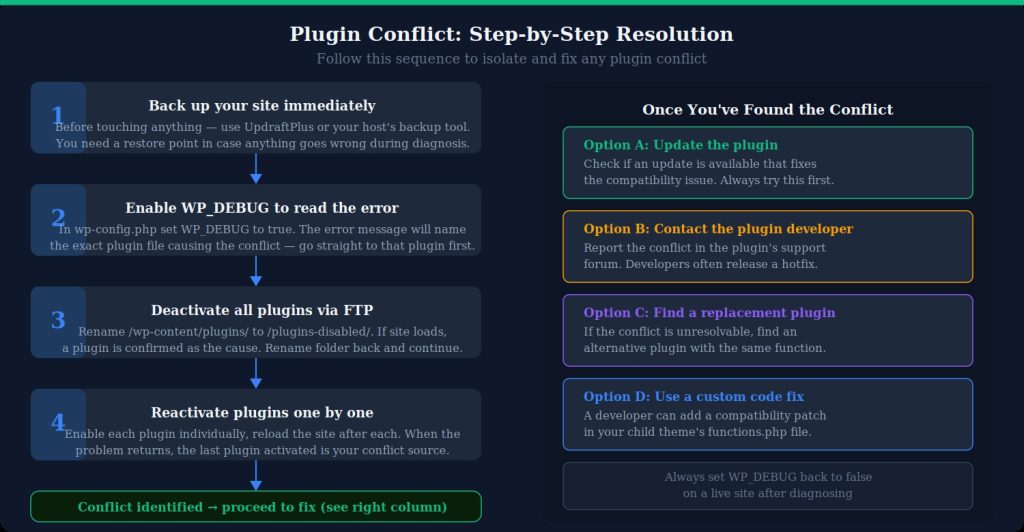
When a business website develops plugin conflicts problems, the cost is often measured in lost attention, failed actions, or support time rather than in a single error message. The right fix starts with evidence and a controlled test plan. U.S. site owners comparing approaches can use practical maintenance insights as general background while keeping the diagnosis tied to their own platform, traffic, and business workflow.
Plugin conflicts can cause anything from a broken editor to failed checkout, missing styles or a completely inaccessible site. The safest diagnosis uses a backup and staging environment, reproduces the problem, then disables or replaces components systematically. Randomly updating or deleting plugins on production can make the original cause harder to find.
Five Services and Providers to Compare for Plugin Conflicts
1. Codeable
Codeable publishes WordPress troubleshooting guidance that specifically covers isolating plugin and theme conflicts, and its expert network handles WordPress development work. It is relevant when a conflict involves custom code, plugin hooks or behavior that cannot be resolved through settings alone.
2. GoWP
GoWP performs WordPress updates with visual checks and also provides backups, monitoring and support. It may fit sites that want ongoing maintenance designed to catch update-related regressions before they become prolonged production problems.
3. WP Buffs
WP Buffs provides WordPress care covering updates, backups, performance and support. It can be relevant when plugin conflicts are one part of a larger maintenance burden and the owner wants a recurring process rather than periodic emergency fixes.
4. FixRunner
FixRunner offers WordPress troubleshooting and support for plugin errors, site problems and maintenance. It may suit smaller sites that need help isolating a conflict quickly and restoring normal behavior without redesigning the entire site.
5. WP Tech Support
WP Tech Support provides WordPress maintenance and technical support services. It can be considered when a site needs recurring update handling, troubleshooting and backup-oriented maintenance rather than relying on ad hoc fixes after a plugin change.
What Should You Check Before Choosing?
Ask providers whether they test updates in staging, preserve a rollback point and document the conflicting versions. A good conflict report should identify the trigger, not only state that “a plugin broke the site.” Keep maintenance notes near practical WordPress guidance so future developers can see which components require extra testing before updates.
For plugin conflicts, ask what evidence will be collected before work begins and what will be retested afterward. A useful provider should be able to explain the rollback path, the parts of the stack they will touch, and any assumptions that remain outside scope. That keeps the project focused and gives the site owner a clear way to judge whether the change actually solved the original problem.
Long-term reliability also depends on ownership after the immediate repair. Decide who watches the affected feature, who receives alerts or support requests, and which changes require a staging test first. Store the recovery steps somewhere the website team can actually find them during an incident. That record should include the date of the fix, the components involved, and any limitations that were accepted. A small amount of documentation can save hours when a later update recreates a similar symptom or when a different developer has to investigate the site without prior context.
It is also worth testing the repaired area under less-than-perfect conditions. Try a slower connection, a smaller screen, an expired session, a failed third-party request, or content that is longer than the normal example. Many website problems disappear during a clean administrator test and return when real visitors use different devices or network paths. Edge-case testing does not need to become a huge QA project; a few carefully chosen scenarios can reveal whether the change is resilient or only works in the exact conditions used while troubleshooting.
Frequently Asked Questions
How do you identify which plugin caused a conflict?
Reproduce the issue on staging, disable plugins, then re-enable them methodically until the problem returns. Error logs and browser-console messages can shorten the process.
Should all plugins be updated at once?
Bulk updates are convenient but make diagnosis harder if something breaks. On important sites, staged or grouped updates with checks between changes provide a clearer rollback path.
Can two well-maintained plugins still conflict?
Yes. Plugins may both be valid individually but interact badly through shared scripts, hooks, database changes or competing features. Compatibility depends on the whole stack.
Build a More Reliable Fix
Plugin stability comes from disciplined change management. Keep backups, use staging, update deliberately and record known compatibility problems. That approach is slower than clicking “update all,” but much faster than reconstructing an outage with no baseline. For additional technical reading alongside vendor notes, teams can keep additional plugin maintenance reading in their maintenance resources.